
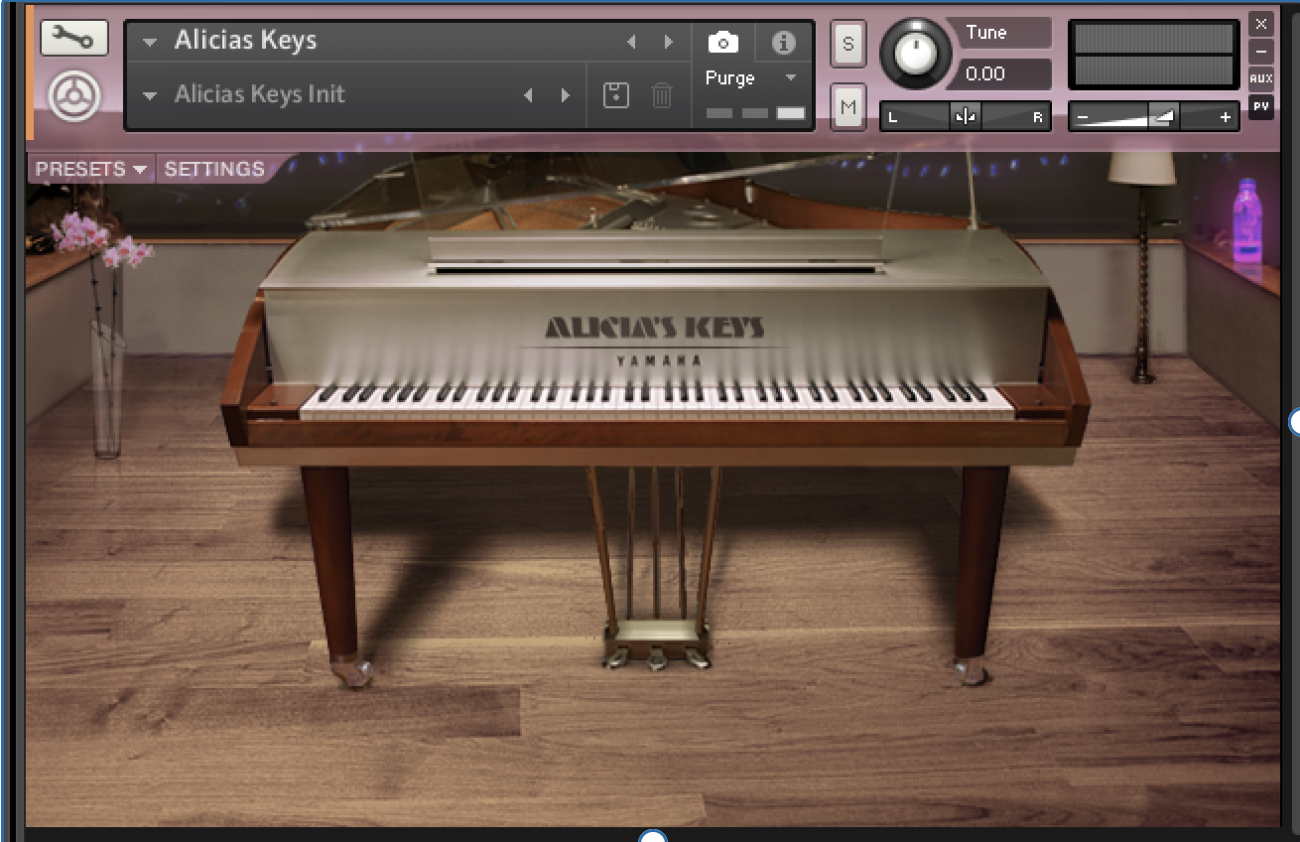
Are you looking for a beautiful, full sounding, grand piano VST? Do you want to make great piano parts with your DAW but feel that the sounds you have to work with feel cheap, thin, or lacking? The Alicia’s Keys Grand Piano might be the solution, a wonderfully large grand piano with a tone that fits right at home in a full scale production dance or pop tune. As a producer of dance music who enjoys the sound of a nice piano in my compositions, this instrument has been my favorite go-to for most occasions. Let’s take a dive into what’s under the hood of this Native Instruments Kontakt instrument and the best way to obtain it if you don’t have it.

The Specs
This instrument is a sampled version of Alicia Keys’ favorite composer piano, the Yamaha C3 Neo, recorded in her home studio. It is a grand piano, and the physical instrument itself is only one of three of it’s kind. It is available from Native Instruments and is an instrument that can be played using their host plug in Kontakt.
You can purchase it on a standalone basis, but if you are looking for the best deal and have your eye on various plug ins by Native Instruments, getting the Komplete Ultimate bundle is probably your best bet, and if you wait until the end of the year sales, you can get it at the best price they have to offer.
The Sound
If you open the settings tab within the instrument, you get many options to manually adjust the sound. The first section that you can dial in is the Room, which includes Digital Ambience, Convolution Reverb, and Stereo Width.
The digital ambience creates a sort of reverb/delay, and the higher you turn the amount the more of a delay it produces. The Convolution Reverb offers a different tone of reverb that actually contains 3 options of rooms: Hall, Auditorium, and Studio. Each one has a unique sound and can be adjusted with the amount and size knobs. The stereo image control affects the stereo width of the sound and can be made to sound more wide or more mono. You can also select between Artist or Audience, which flips the sides that you hear the high and low end notes on respectively.

The next section is called Keys, which affects the sound of the keys as you strike them. The first setting is called Velocity Curve, which simply changes how the instrument responds to the velocity of the notes hit, with concave curves being louder on average and convex curves being quieter. Next, you have a knob called Finger Attack. As you increase the amount here, you get a slower attack but more of the noise of the finger striking the key. After that, there’s a knob called Key Release, which adjusts how quickly the keys are released when you let them go. Both the key release and finger attack controls are going to be very subtle changes in the sound. The final setting here is called self masking / repetition, and these modes change the way the notes fade out when new notes are pressed, with the aggressive setting fading them out quicker and the kill only old notes setting letting the notes ring out the longest.
The following sections all involve the Pedal and interact with each other when the pedal is pressed down or released (which you can control with an actual pedal or via automation in the Pedal tab). The manual describes each of these parameters, but truth be told, in as much experimenting as I could try, I couldn’t really hear a difference playing around with it even on the most extreme settings, so if any of you have any further knowledge about the pedal in this instrument, and if it really is just extremely subtle or if there are specific scenarios where you can hear very obvious differences, please comment below!
Another way to go about changing the sound more simply is to use the presets, there are a bunch of premade sounds for specific situations under the presets tab! This can help you quickly get to a good starting point to just start playing or composing. By far the biggest differences you can change in this instrument are the reverb/room settings and th velocity curve.
Closing Thoughts
This piano is a really bright and full grand piano sample that perfectly pairs in a large scale production pop or dance tune with a bass underneath and a vocal topline. One of my go-to’s and one that I think anyone producing in a similar genre should check out!
As a producer, my primary genre is drum & bass, and you can listen to my music here for any of you who are interested!
Stay creative my friend!
-Ryahu

Leave a Reply